Showing posts with label samsung galaxy a8. Show all posts

12.24.2015

Samsung Galaxy A8 vs Samsung Galaxy S6: What’s different in Samsung S6 and Galaxy A8?


Samsung Electronics Co., Ltd. launched in China last week its thinnest smartphone, the Samsung Galaxy A8; but reports say that it will be heading for a South Korean debut as well.Samsung announced last Monday that the smartphone will be released in South Korea on July 24, according to reports.

Galaxy A8, Samsung's thinnest device yet, measuring only 5.9 millimeters thick and weighs 5.3 ounces, will be available in two color options: white and gold.

Samsung has been concentrating on releasing a wide range of smartphones and phablets over the past few months and recently, the company announced the arrival of the Galaxy A8 phablet. Here is how this new phablet compares to the flagship Galaxy S6 smartphone.

Samsung Galaxy S6 Release Date: April 2015; and the Operating System Version is Android 5.0 Lollipop; US Carrier: AT&T Wireless, Boost Mobile, Cricket, Metro PCS, Sprint, T-Mobile, U.S. Cellular, Verizon Wireless

What's different in Samsung S6 and Samsung Galaxy A8?


Design

When it comes to design, the Galaxy A8 is better as it has a full metal body and is also ultra slim — only measuring 5.9 mm compared to the 6.8 mm of its flagship sibling, the Galaxy S6. Additionally, it has a fingerprint scanner, very slim bezels and comes in three colors, white, black and gold.

As for the Galaxy S6, it has a metal frame and front and back panels layered with Gorilla Glass 4 that is highly polished. It, too, has a finger print scanner just below the display and it comes in a variety of colors ranging from white, black, gold, platinum and blue.

Display

There is no beating the size of the display on the Galaxy A8. It comes with a super AMOLED screen measuring 5.7 inches with a resolution of 1080 x 1920 pixels and a density of 386 pixels per inch. However, the display on the Galaxy S6 is sharper as it has a super AMOLED screen measuring 5.1 inches with a resolution of 1440 x 2560 pixels and a density of 577 pixels per inch.

Specs

The hardware on the Galaxy A8 lags behind that of its sibling and causes the device to fall in the mid-range. It comes with a Qualcomm Snapdragon 615 chipset, along with an octa-core CPU comprised of four Cortex-A53 cores clocked at 1.5 GHz and four Cortex-A53 cores clocked at 1.0 GHz and an Adreno 405 GPU.

As for the Galaxy S6, it has the latest Exynos 7420 chipset, an octa-core CPU comprised of four Cortex-A53 cores clocked at 1.5 GHz and four Cortex-A57 cores clocked at 2.1 GHz and a Mali-T760MP8 GPU.

Memory

There is a memory slot on the Galaxy A8 which can be used to add up to 128 GB of external storage. Those who want to opt for the Galaxy S6 will have to make do with its internal storage as it does not have a slot. As for RAM, the Galaxy S6 has 3 GB while the Galaxy A8 has 2 GB.

Price

The Galaxy A8 has been launched in China and is expected to have a price tag of around $515 when it rolls out worldwide. The Galaxy S6, on the other hand, costs $199 with a two-year contract.

Read more:

When you buy a new Samsung Galaxy S6 or Galaxy A8,if you use iPhone or Samsung Galaxy S4/S3/S2, Galaxy Note 4/3/2,Ace,ect before,the first thin you need to do is transferring data from old phone to new Samsung Galaxy smartphone.To copy data from old phone to new Samsung phone,you can follow the next use guides:

Once lost contacts,text messages, photos, videos and other data on your new Samsung S6/A8,you still have chance to recover lost data from Galaxy A8/S6 directly,to get lost data back from Samsung Galaxy,please read more:


10.30.2015

How to Recover Deleted/Lost Contacts from Samsung A8

Part 1: Samsung News
Part 2: How to Recover Deleted/Lost Contacts from Samsung A8
Part 3: More related articles


----------------------------------------------------------------------------------------------------------------------------------


Samsung News

Samsung Galaxy A8 history of the thinnest mobile phones are now coming out of Samsung's official website officially announced the details of various aspects. Samsung's official website information display, Samsung Galaxy A8 public version will be available in black, white, gold three color options.


Samsung Galaxy A8 is known as the history of the thinnest Samsung phone, because it has a thickness of only 5.9mm slim. Also, the machine also uses ultra-narrow frame design one metal and loaded 3050mAh battery in a slim body, a power superior, long-lasting battery life.

Camera, the Samsung Galaxy A8 rear 16 million pixel camera, combined with F1.9 large aperture, wide angle support self-timer, and have beautiful skin function.


In addition, it is equipped with eight-core processor, 5.7-inch full HD Super AMOLED screen, higher performance, color reproduction is also very high.

Should be one, it also to enhance the user experience, combined with domestic users accustomed to customized localization page, such as a menu upgrade, strange caller identification information may replace background.

----------------------------------------------------------------------------------------------------------------------------------


Recover Deleted/Lost Contacts from Samsung A8

“Help! After restore factory setting for my Samsung Galaxy A8,it cause erase any contacts,is there any one can help you recover lost contacts from Samsung Galaxy A8? Thank you!”

“Yesterday,I deleted an important contacts on my Samsung Galaxy A8,now I want to restore the deleted contacts back from Galaxy A8,is it possible to get deleted contacts back on Samsung A8?”

Can you imagine that you got all your contacts on your new Samsung Galaxy A8? After almost a year, finally you get the longing Galaxy A8 and everything goes so great. But an unexpected case happened that you carelessly got your contacts lost. If you want to recover Galaxy A8 lost contacts,this article teach you a easy way to get them back directly.

Actually,we tell you that the contacts you deleted still exist in your Samsung smart phone! They don’t go to the trash. These contacts are just marked as useless information once deleted and can be overwritten by new data. You can still restore deleted contacts on Samsung Galaxy A8 until they are overwritten. Let’s teach you the easy way to restore Samsung Galaxy A8 lost contacts.

Restore Deleted or Lost contacts from Samsung Galaxy A8

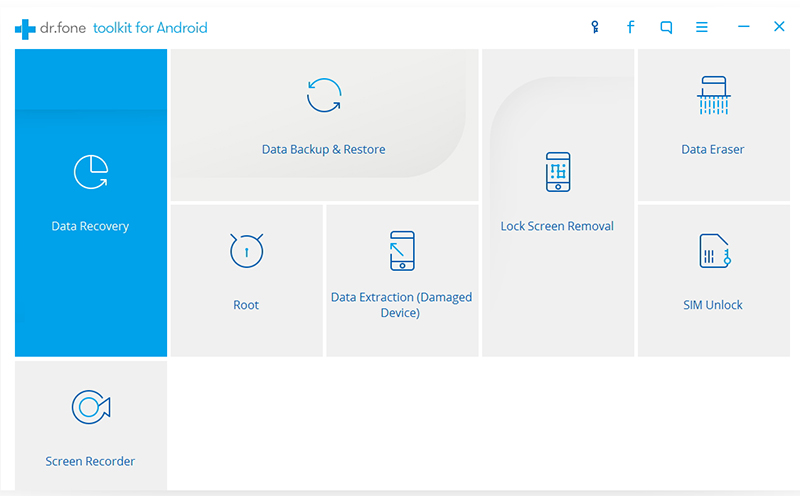
You can use this Samsung Galaxy Data Recovery: Android Data Recovery to scan and restore deleted contacts from Samsung Galaxy A8 directly.
The Andriod Data Recovery not only allows you scan and recover deleted or lost contacts on Samsung Galaxy A8,but also can help you retrieve lost contacts on Samsung A8 directly in the same steps.To restore lost data from Samsung Galaxy phone,this data recovery for Samsung program is able to access the internal memory to find the lost data including text messages, photos, contacts, etc. The passage below will show you in details how to recover lost contacts from Galaxy A8.

First of all,you need to download the android data recovery for free:


Best way to Recover Deleted contacts from Samsung Galaxy A8?

Step 1. Download the program and run it on your computer

First, please download the Samsung Data Recovery problem on your computer, and then connect your Samsung Galaxy A8 device to the computer via USB.

Step 2. Enable USB Debugging on Samsung Galaxy A8

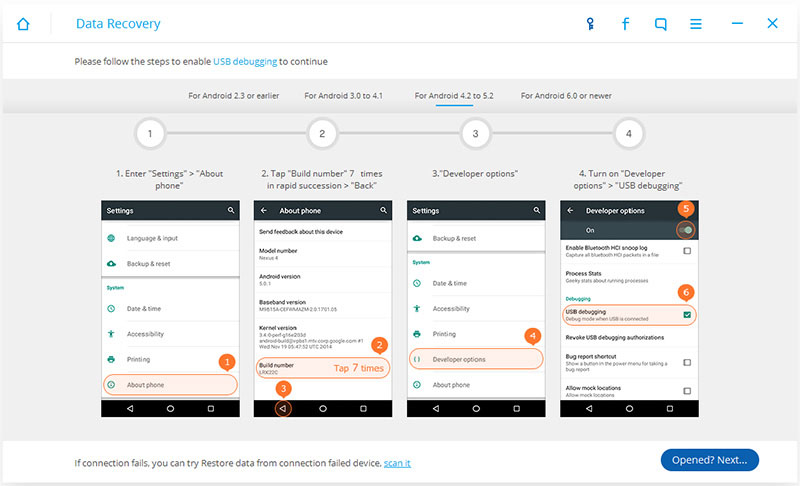
USB debugging must be enabled on your Samsung phone,Here are the ways based on different Android versions.

1) For Android 2.3 or earlier: Enter "Settings" < Click "Applications" < Click"Development" < Check "USB debugging"
2) For Android 3.0 to 4.1: Enter "Settings" < Click "Developer options" < Check "USB debugging"
3) For Android 4.2 or newer: Enter "Settings" < Click "About Phone" < Tap "Build number" for several times until getting a note "You are under developer mode" < Back to "Settings" < Click "Developer options" < Check "USB debugging"


Step 3. Analyze and scan your Samsung for preparation

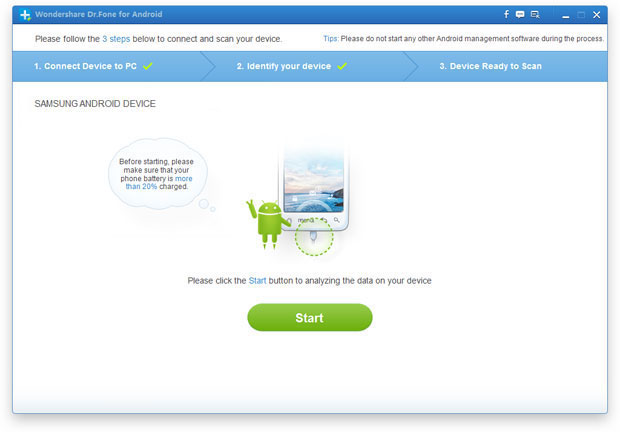
After your Samsung detected automatically by the program, click "Start" button. The deep scan is a little time-consuming.


Later, tap on the "Allow" button to let the program scan your phone for lost messages, contacts, photos and video on your Samsung Galaxy A8.

Step 4. Preview and recover contacts from Samsung A8

Make sure your phone battery is no less than 20%. When the program show you the scanning results, you can preview and check them one by one before recovery. Not just contacts, you also can selectively recover your Contacts, Videos, Gallery, etc. from your Samsung Galaxy. Click "Recover" button to save them on the computer which you want.


Note: What's more, The Samsung Galaxy Data Recovery- Android Phone Data Recovery is also compatible with LG, HTC,Motorola, Sony, ZET, Huawei, etc.You can also use this data recovery for android phone to recover sms,contacts, photos, videos,ect from other android mobile phone directly.


Related Articles About Samsung Galaxy A8 Recovery:
Once lost data on your Samsung Galaxy A8,or accidentally deleted files on the Samsung A8, you can also recover lost contacts, messages, videos, photos, notes and more with Samsung Galaxy Data Recovery.

Recover Deleted Contacts from Samsung Galaxy A8
After root your Galaxy A8 and erase all contacts? Deleted phone numbers on your Samsung A8? If you don't have to write new data, you can choose this useful data recovery software for android- Android Phone Data Recovery software to recover deleted contacts on your Samsung Galaxy A8. The software can restore the deleted phone numbers and other data on your Galaxy A8 directly without backup.

----------------------------------------------------------------------------------------------------------------------------------


More related articles


How to Recover Deleted Pictures in Galaxy Note 4

Recover Deleted Contacts/ Photos from Samsung galaxy S6 Edge

How To Recover Deleted Messages On Samsung Alpha